

We may earn a small commission on some links at no extra cost to you. Learn more.

If you’ve ever walked into the gym with no real plan… and walked out an hour later not quite sure what you actually achieved, a good weightlifting app can make a huge difference.
The best ones do a lot more than just count reps. They show you how to do each exercise properly, log your weights and sets, tell you when to push harder (and when to back off), and swap exercises out when the squat rack is taken or you’re training at home.
I’ve been testing fitness and workout apps for years now, and there are a lot of them out there. Some are brilliant, and some are glorified exercise GIF libraries with a monthly fee attached.
So for this roundup review of the best weightlifting apps for strength training, I’ve narrowed it down to 7 apps that each do one thing better than the rest… whether that’s building muscle, getting started as a beginner, or having a real coach in your pocket.
(We’ve also managed to negotiate some unique discounts on some apps to help you get started).
BEST WEIGHTLIFTING APPS
ALPHA PROGRESSION
Best overall.
MUSCLE BOOSTER
Best for beginners.
SWEAT
Best for women.

CALIBER
Best for coaching.
Why Trust Us? Review Process Explained
Here at Fitness Drum, we believe in editorial integrity and providing genuine value to our readers. For this review, we tried and tested over 30 popular fitness apps (referenced at the bottom of the page) and rated each app based on progression, exercise demos, logging, personalization, guidance and value for money. Editor’s Note – we update this post every few months to keep prices and features accurate (last updated September 2026).
What Makes a Good Strength Training App?
Before getting into the list, it’s worth explaining how I’ve ranked these. As a personal trainer, these are the things I look for (and they’re the reason each app has landed where it has).
Progressive overload built in. This is the big one. Progressive overload (gradually upping the weight, reps or sets over time) is proven to be the most effective way to build muscle and strength. A good app should track what you lifted last time and tell you what to aim for next… not leave you guessing. This is exactly why Alpha Progression takes top spot, and why FitnessAI ranks well for its AI features.
Quality exercise demonstrations. Poor form leads to poor results (and injuries). I much prefer real human videos over animated graphics, ideally from multiple angles. Alpha Progression, Caliber and Sweat all do this very well.
Easy logging. If logging a set takes more than a couple of taps, you’ll stop doing it. And if you stop logging, the app can’t help you progress.
Personalisation. Your plan should reflect your goals, experience and the equipment you actually have. Apps like Muscle Booster and Shred ask detailed questions up front and build around your answers, which is a big part of why they’re so beginner-friendly.
Guidance and accountability. Some people just need the numbers. Others need someone (or something) keeping them on track. Caliber stands out here with real human coaches, while Sweat and BODi lean on community and structured programs.
Value for money. Prices vary a lot, from free up to $200+ a month for 1-2-1 coaching. I’ve weighed up what you actually get for your money, not just the headline price.
No app scores perfectly across all 6… which is why I’ve grouped them by what they’re best at.
Alpha Progression – Best Overall
Alpha Progression
Powerful features designed to help you track workouts more efficiently, uses artificial intelligence to customize your workouts.
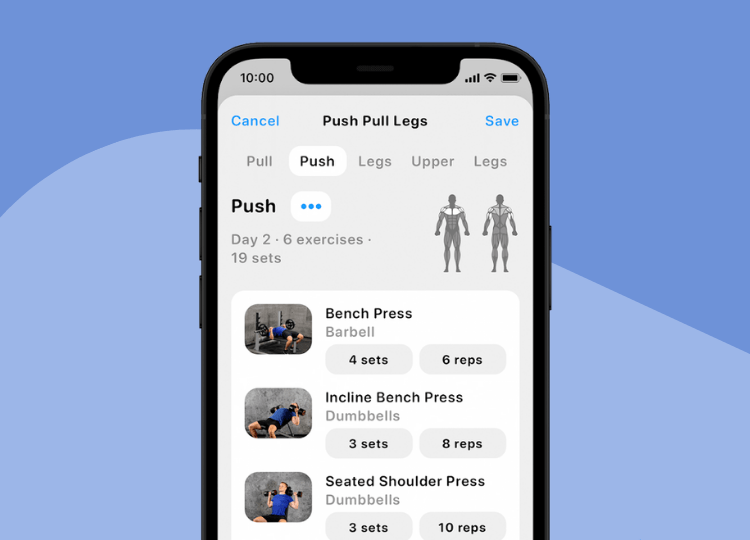
I’ve been using Alpha Progression for well over a year now, and it’s still the app I open every time I walk into the gym. It’s built for one thing… helping you build muscle through progressive overload. And it does that better than anything else I’ve tried.
What I like
The progression recommendations are the standout feature. For every set, the app tells you the exact weight, reps and RIR (reps in reserve) to aim for, based on what you did last time. It takes all the guesswork out of training, and it’s the reason I’ve consistently hit small PRs throughout each training block.
The plan generator is also excellent. You tell it your goals, experience, training days and available equipment, and it builds a proper split (push/pull/legs, upper/lower, full body, etc.) with periodisation and deload weeks built in. That’s the sort of programming you’d usually pay a personal trainer for.
The exercise library now has 795 exercises, each with real gym videos filmed by certified trainers. You can also set up multiple gym profiles, so if you train at home and at a commercial gym (or travel a lot), the app only shows exercises you can actually do. Logging is quick, the charts now show estimated 1RM alongside 10RM, and it works fully offline, which is handy in gyms with poor signal.
Things to consider
There’s still no Apple Watch or Wear OS app (the one thing I’d really like to see added), and cardio tracking is limited. It’s a weightlifting app, not an all-round fitness app. There’s also now a free version, but the features that make Alpha special (the generator and progression recommendations) are Pro only.
Why it’s Best Overall: It ticks the most boxes on my list, especially progressive overload, which is the one that matters most. Read my full Alpha Progression review.
Muscle Booster – Best for Beginners
MUSCLE BOOSTER
Personalised workout plans, guided exercise demonstrations, 2,000+ exercises for home and gym, flexible equipment options.
If you’re new to strength training, or coming back after a long break, Muscle Booster is the app I’d point you towards. It’s much less intimidating than a pure gym logger, and it holds your hand from the very first session.
What I like
The onboarding is one of the most detailed I’ve come across. It asks about your goals, experience, problem areas, available equipment and how long you want to train for, then builds a plan around your answers. Every workout comes with a warm-up and cool-down, which is something beginners often skip (and then regret).
The exercise library is huge, with 2,000+ exercises covering strength, cardio, mobility and recovery. If you don’t like an exercise, or can’t do it because of an injury, it’s easy to swap it out. The app also works for both home and gym workouts, syncs with Apple Watch for heart rate tracking, and includes meal planning and a calorie tracker.
The interface is clean and simple, with nothing that feels overwhelming. It also has gentler options like chair-based workouts, which makes it one of the few apps I’d happily recommend to older adults or anyone working around an injury.

Things to consider
Muscle Booster doesn’t let you log the actual weights you lift, which limits it as a strength tracker. Once you’ve built some confidence and want to properly chase progressive overload, you’ll likely outgrow it (and that’s where something like Alpha Progression comes in). Subscriptions also auto-renew (and deleting the app doesn’t cancel it), so make sure you cancel through the App Store or Google Play before your renewal date if it’s not for you.
Why it’s Best for Beginners: It scores highly on personalisation and guidance, which matter most when you’re starting out. Read my full Muscle Booster review.
Sweat – Best for Women
Sweat
30+ million downloads, 34,000+ 5 star reviews, quality workout programs, meal planning, progress tracking and community.
Sweat was co-founded by Kayla Itsines and is designed specifically for women, with an all-female team of trainers. It’s one of the most established fitness apps around, and in my opinion it’s still the best choice for women who want structured strength training with plenty of support.
What I like
The programs are properly designed, with periodisation built in rather than a random mix of workouts. For lifting, PWR with Kelsey Wells is the standout gym program, and there are also strength options from Kayla Itsines, Britany Williams and Cass Olholm. Beyond strength, there’s HIIT, yoga, Pilates, barre, low-impact and pregnancy/postnatal programs, so it covers you whatever stage you’re at.
Each exercise has a clear demo video and description, you can swap exercises if equipment is taken, and you can view the whole workout before you start. The community is a big part of Sweat too… the in-app forum and challenges add a level of accountability most gym loggers simply don’t have. It also works with Apple Watch and syncs with Apple Health.
Things to consider
It’s one of the pricier apps on this list. The rest periods are fairly rigid, and you have to tap through to the next set manually, which can be a little awkward when you’re holding dumbbells. There’s also no offline mode, and once you cancel you lose access to everything.
Why it’s Best for Women: Expert programming, strong community support and a range of programs that grows with you. Read my full Sweat review.
Shred – Best for Fast Results
SHRED
AI-powered virtual trainer providing customized workouts with real-time adaptive coaching and comprehensive progress tracking.
Shred is built for people who want to train hard, keep sessions short and see changes quickly. Where Alpha Progression is methodical, Shred is high-energy… think circuits, supersets and finishers designed to get your heart rate up while you lift.
What I like
The AI coaching adapts your plan based on how each session went. After a workout you rate whether exercises felt too easy, about right or too hard, and future sessions adjust accordingly. It also suggests weights and tracks your reps, so there’s a degree of progressive overload built in.
There’s a good range of program types, including hypertrophy, strength, powerlifting, bodyweight and sculpting, and you can set it up for a commercial gym or a home setup with just dumbbells, bands or kettlebells. The HD demo videos are shot from multiple angles, and real-time voice coaching talks you through each workout, which is great if you don’t want to keep looking at your phone. The Apple Watch app is also one of the better ones I’ve seen, with demo videos showing right on your wrist.
A recent update also added the ability to build your own workouts, which was the one big thing I felt it was missing.
Things to consider
The circuit-style format is efficient, but it can be tricky in a busy gym when you need three bits of equipment at once. Serious lifters chasing big barbell numbers may also find the variety gets in the way of structured progression (there’s no real periodisation or deload structure). The videos need an internet connection, and there’s no nutrition guidance.
Why it’s Best for Fast Results: Time-efficient, high-intensity sessions with voice coaching keep you moving and motivated… and consistency is what gets results. It’s less precise than Alpha for pure muscle building, but more engaging for many people.
Caliber – Best for Coaching
CALIBER
Science-based strength training app connecting you with elite personal trainers for truly personalized programming and accountability.
Caliber is the only app on this list where a real human coach can write your program, check your form and keep you accountable. And the free version is also one of the best free workout loggers available.
What I like
The free app alone is very generous. You get unlimited custom workouts and tracking, plus 800+ exercise tutorials with video demos that break each movement into phases. It’s ad-free, and charts show your estimated 1RM over time.
Caliber Plus unlocks 120+ coach-designed training plans, plus the Strength Score and Strength Balance metrics, which show how each muscle group is developing compared to the others. It’s a nice way to spot weak links.
But the real reason Caliber is here is Premium Coaching. You’re paired with a certified coach who builds your plan, reviews your form videos and messages you daily, with weekly video check-ins. Nutrition and lifestyle coaching are included too, and Caliber backs it with a results guarantee (or your money back). When I used Caliber, the coaching felt like having a PT in my pocket, without having to fit around their diary.
Things to consider
Premium Coaching is expensive compared to every other app here, although it’s still cheaper than most in-person personal trainers. Some features that used to be free have also moved behind the Plus paywall, and the app needs an internet connection for some basic functions.
Why it’s Best for Coaching: It’s the clear winner for guidance and accountability, with a real human in your corner. Read my full Caliber review.
Fitness AI – Best AI Features
FITNESS AI
Let FitnessAI’s algorithm work out your sets, reps and weights for every workout, then just turn up and lift.
Plenty of apps now say they use “AI”, but FitnessAI was one of the first to build its whole product around it. If you like the idea of an algorithm deciding your sets, reps and weights for every session, this is the one to look at.
What I like
FitnessAI’s algorithm was originally trained on 5.9 million workouts from around 40,000 lifters, and the company now says it’s powered by over 100 million logged sets. In practice, you tell it your goals, available equipment and how often you train, and it generates each workout with specific weights for every set. When a lift starts to feel easy, it bumps the weight up. When you struggle, it pulls things back.
That makes it very hands-off… you just open the app, follow the numbers and log what you did. It’s very quick to use, workouts can be as short as a few minutes, and it adapts easily between gym, home and travel setups. It also syncs with Apple Watch and Apple Health, and tracks body composition over time. In my opinion, it’s ideal for anyone who just wants to be told what to lift, without the chit-chat of a PT.
Things to consider
The exercise demos are animated rather than filmed with real people, which I find less useful for learning form. You also have less control over your program than with Alpha Progression, and the app doesn’t always explain why it’s made a decision… which can be frustrating if you like to understand your programming. There’s no stretching or cool-down content either.
Why it’s Best AI Features: It’s the most fully automated option here, with a huge dataset behind its progressive overload recommendations. Alpha Progression still edges it overall for programming depth and exercise demos.
BODi – Best Program Library
BODi
Get unlimited access to 225+ structured programs, from LIIFT4 to P90X, all backed by a 31-day money-back guarantee.
BODi (formerly Beachbody On Demand) is the home of cult programs like P90X, LIIFT4 and 4 Weeks for Every Body. It isn’t a gym logger… it’s a follow-along platform. But no other app comes close to the size of its library.
What I like
BODi now includes 225+ programs and over 9,000 workouts. For strength training specifically, LIIFT4 (a 4-day-a-week lifting program), Muscle Burns Fat and P90X are all worth a look, and there’s plenty of cardio, yoga, Pilates, barre and low-impact content alongside them. You could follow a different program every month for years and not run out.
Every program is structured, with a calendar that tells you exactly what to do each day, and the trainers are high-energy and encouraging (Shaun T, Autumn Calabrese and Joel Freeman are among the big names). The BODgroups community helps with accountability, workouts can be downloaded for offline use, and there are over 1,000 recipes if you want nutrition support too.
Things to consider
BODi is built for home workouts with minimal equipment, so it won’t track your lifts or suggest weights the way Alpha Progression or FitnessAI do. The nutrition side leans heavily on Shakeology and other supplements. Renewals are also non-refundable, so keep an eye on your renewal date.
Why it’s Best Program Library: Nothing else on this list offers anywhere near as many structured programs, which makes it great value if you like variety. Read my full BODi review.
Comparison Table
| App | Best for | Free version | Paid price (US) | Logs weights | Real human demos | Human coaching |
|---|---|---|---|---|---|---|
| Alpha Progression | Overall | Yes | $79.99/yr | Yes | Yes | No |
| Muscle Booster | Beginners | No | ~$59.99/yr | No | Yes | No |
| Shred | Fast results | Limited | $99.99/yr | Yes | Yes | No |
| Sweat | Women | No | $134.99/yr | Yes | Yes | No |
| Caliber | Coaching | Yes | ~$12/mo (Plus), ~$200/mo (coaching) | Yes | Yes | Yes |
| FitnessAI | AI features | No | ~$89.99/yr | Yes | No (animated) | No |
| BODi | Program library | No | $179/yr | No | Yes | No |
Bottom Line
If you want one app to build muscle and get stronger in the gym, Alpha Progression is my top pick. It’s the one I use myself, the progression recommendations genuinely take the guesswork out of training, and there’s now a free version to try it out. Fitness Drum readers can also get 20% off Pro (including the 14-day free trial) with code FD20.
If you’re just getting started, Muscle Booster is the gentlest way in. If you want a real person keeping you accountable, Caliber’s coaching is worth the extra cost. And if variety keeps you motivated, BODi’s library is hard to beat.
Whichever app you choose, the most important thing is to log your workouts consistently. Even the smartest app can’t help you progress if it doesn’t know what you lifted last week.
Methodology
To create this roundup review, we used the following apps: Fitbod, Alpha Progression, Beachbody, Openfit, P.volve, Centr, Stronglifts, MyFitnessPal, 8fit, VAHVA, The Movement Athlete, DailyBurn, Obe Fitness, JEFIT, Nike Training Club, Tone It Up, StrongrFastr, Pliability, StretchIt, Future, ATG, Berg Movement, Caliber, Strength Well, Home Workout – No Equipment, Strava, Peloton, Virtuagym, 7 Minute Workout, HIIT Down Dog, Asana Rebel, Fitify, Adidas Training, Shred, Yazio, Cronometer, Man Flow Yoga, FitOn, Mobility Manual, Gymondo, Sweat and Sworkit.
FAQs
Free Vs Paid Apps – What’s the Difference?
If you’re searching for any sort of fitness app, you’ll notice there are free and paid options. Free apps tend to have limited features and will also offer paid subscriptions to unlock the full app, or include ads as a way to monetize their business.
Paid fitness apps tend to include more features and leverage more technology more, such as using A.I. to generate workouts.
Lots of paid apps will include free trials, so we’d recommend signing up and seeing for yourself if they are worth the monthly cost.
What Features Make Great Weightlifting Apps?
The ability to log workouts is probably the most important feature for anyone lifting weights. Being able to track your progress will definitely help with motivation and make your training more effective.
Creating custom workout plans or following professionally created workouts are also features that we think are really useful for any sort of strength training. This allows you to tailor your training to specific goals, such as trimming down or bulking up.
We think exercise demonstrations would also be useful for beginners too. Having exercise alternatives (perhaps low-impact variations, for example) is another really helpful feature, especially for anyone who may struggle with certain movements and wants advice on exercises that work similar muscle groups.
Insights into muscle group recovery is also a great feature Fitbod initially launched (others are likely to follow suit), that means you can see what muscles are due to be trained and which ones need rest, based on your goals. This helps you understand how many days you should be training and when certain muscles need a rest to avoid overtraining them.
Weightlifting Vs Fitness Apps – What’s the Difference?
Weightlifting apps would be seen as a category of fitness apps… focused on helping users lift weights. Fitness apps can include more variety, such as calisthenics/bodyweight, running, cycling, and other forms of exercise. Weightlifting apps would be best suited to those who enjoy lifting weights (dumbbells, barbells, kettlebells, and other forms of resistance).
Related Articles:
Best Online Fitness Programs and Apps